


Introduction to Amazon Fire Tablet
Overview of Amazon Fire Tablet
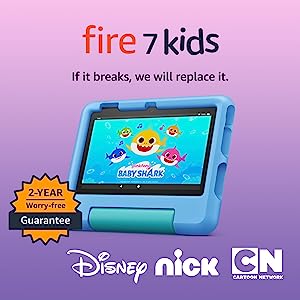
The Amazon Fire tablets are a popular choice for parents looking for educational devices for their kids. These tablets, such as the Amazon Fire 7 Kids tablet (ASIN: B0C2RRYXTK), offer a range of features that make them perfect for young learners. With their durable design and Kid-Proof Case, parents can feel confident that the tablet will withstand accidental drops and bumps. The tablets also come with a 1-year subscription to Amazon Kids+, providing access to thousands of ad-free books, games, videos, apps, and more. Additionally, parents can use the Parent Dashboard to customize content based on their child’s age and set educational goals. The Amazon Fire tablets are a reliable and affordable option for introducing educational apps to kids.
Setting up Amazon Fire Tablet for Kids
Setting up an Amazon Fire tablet for kids is a straightforward process. Once you have obtained the tablet, like the Amazon Fire HD 8 Kids Pro tablet (ASIN: B09BG6DSBY), you can begin by creating a child profile. This profile allows you to customize settings and content specifically for your child. With parental controls, you can manage screen time limits, filter age-appropriate content, and monitor usage. Additionally, the tablet’s Kid-Friendly Case provides added protection, and the strengthened glass screen ensures durability. By utilizing the tablet’s built-in features and parental controls, you can create a safe and engaging digital environment for your child’s learning and entertainment.
Top Educational Apps for Preschoolers on Amazon Fire Tablet

App 1 – ABC Kids – Tracing & Phonics
ABC Kids – Tracing & Phonics is an excellent educational app available on the Amazon Fire tablets. It offers a fun and interactive way for kids to learn the alphabet, phonics, and letter tracing. The app includes colorful graphics, engaging animations, and interactive games that make learning enjoyable for young children. With the app, kids can practice tracing uppercase and lowercase letters, learn letter sounds, and explore words associated with each letter. ABC Kids – Tracing & Phonics is designed to enhance early literacy skills and help children develop a strong foundation in reading and writing.
App 2 – Endless Alphabet
Another fantastic educational app for kids on the Amazon Fire tablets is Endless Alphabet. This app introduces children to a wide range of vocabulary words through interactive puzzles and animations. Each word is presented with a playful monster that demonstrates the meaning of the word. Kids can drag and drop letters to complete the words, and once completed, they can watch a short animation that reinforces the word’s meaning. Endless Alphabet is a creative and engaging app that promotes vocabulary development, letter recognition, and phonics skills in a fun and entertaining way.
Top Educational Apps for Elementary School Kids
App 3 – Prodigy Math Game
Prodigy Math Game is an excellent educational app for kids available on the Amazon Fire Tablet. This app combines the fun of a role-playing game with math learning, making it engaging and interactive for children. With over 1,400 math skills for grades 1-8, Prodigy Math Game adapts to each child’s level and provides personalized learning. It covers various math topics, including addition, subtraction, multiplication, division, geometry, and more. The app uses a game-based approach to motivate kids to practice math and improve their skills. Parents can track their child’s progress through the app’s dashboard, making it easier to monitor their learning journey.
App 4 – Duolingo
Duolingo is a fantastic language learning app that can be accessed on the Amazon Fire Tablet. With Duolingo, kids can learn different languages in a fun and interactive way. The app offers courses in over 30 languages, including Spanish, French, German, and more. It uses gamification techniques to engage children and make language learning enjoyable. Duolingo focuses on building vocabulary, grammar, and pronunciation skills through various activities like listening exercises, speaking exercises, and interactive quizzes. The app also offers a progress tracker, allowing parents to monitor their child’s language learning journey. Duolingo is a great resource for kids who want to explore new languages or enhance their language skills.
Top Educational Apps for Middle School Kids with Amazon Fire Tablet

App 5 – Khan Academy Kids
Khan Academy Kids is an excellent educational app for kids available on the Amazon Fire Tablet. This app offers a wide range of interactive activities and lessons that cover various subjects such as math, reading, and science. It features engaging videos, interactive quizzes, and colorful animations to make learning fun and exciting for children. With the Amazon Fire Tablet’s user-friendly interface and vibrant display, kids can easily navigate through the app and enjoy the educational content. Khan Academy Kids also provides personalized learning experiences, allowing children to progress at their own pace and explore topics that interest them. Overall, this app is a valuable tool for parents looking to enhance their children’s learning experience on the Amazon Fire Tablet.
App 6 – Quizlet
Quizlet is another fantastic educational app that is compatible with the Amazon Fire Tablet. This app offers a variety of study materials and interactive flashcards to help kids learn and memorize different subjects. With Quizlet, children can create their own flashcards or choose from a vast library of existing sets for various topics. The app also includes games and quizzes to make learning more engaging and interactive. The Amazon Fire Tablet’s powerful processor and ample storage capacity ensure a smooth and seamless experience while using Quizlet. Whether it’s learning a new language, studying vocabulary, or reviewing math concepts, Quizlet provides a comprehensive platform for educational growth. With its compatibility with the Amazon Fire Tablet, Quizlet is an excellent choice for parents and children seeking educational apps.
Top Educational Apps for High School Kids
App 7 – Photomath
Photomath is a must-have educational app for kids on the Amazon Fire Tablet. With this app, children can easily solve math problems by simply taking a photo of the equation. Photomath uses advanced technology to recognize and solve the equation instantly, providing step-by-step explanations along the way. This interactive approach helps kids understand the concepts behind the math problems, making learning more engaging and effective.
The Amazon Fire Tablet’s compact size and vibrant display make it an ideal device for using Photomath. Kids can use the tablet’s camera to capture equations from textbooks or worksheets and receive instant solutions and explanations. This app not only helps children with homework but also serves as a valuable tool for independent learning. With Photomath on the Amazon Fire Tablet, math becomes more accessible, interactive, and enjoyable for young learners.
App 8 – SoloLearn
SoloLearn is a fantastic educational app available on the Amazon Fire Tablet that introduces kids to the world of coding and programming. With SoloLearn, young learners can explore various programming languages, including Python, JavaScript, and C++, through interactive lessons and quizzes. This app encourages kids to develop problem-solving skills, logical thinking, and creativity, all essential for future success in the digital age.
The Amazon Fire Tablet’s user-friendly interface and portability make it an excellent platform for kids to dive into coding with SoloLearn. The tablet’s touch screen enables children to interact directly with the app, making learning programming concepts more intuitive. SoloLearn offers a supportive community where kids can share their projects, ask questions, and receive feedback from fellow young coders. With the combination of SoloLearn and the Amazon Fire Tablet, kids can embark on a coding journey and unlock their potential in the world of technology.
Conclusion and Final Thoughts on the Amazon Fire Tablet

Recap of the Best Educational Apps for Kids on Amazon Fire Tablet
With the ever-growing popularity of technology, it’s essential to provide children with educational apps that can complement their learning experiences. The Amazon Fire Tablet offers a wide range of apps designed to engage and educate kids. One highly recommended app is ABCmouse, an interactive platform that covers various subjects like math, reading, and science. Its well-designed interface and engaging content make learning fun for kids of all ages.
Another top app is Khan Academy Kids, which offers a comprehensive curriculum spanning from early learning to advanced subjects. It features interactive activities, videos, and quizzes to enhance children’s understanding. The Amazon Fire Tablet also includes Epic, an app that offers unlimited access to a vast library of children’s books. This app encourages reading skills development and fosters a love for literature.
Additional Tips for Maximizing Educational Benefits of Amazon Fire Tablet
To maximize the educational benefits of the Amazon Fire Tablet, it’s crucial to establish clear boundaries and monitor screen time. Create a schedule that allows your child to have designated learning sessions with the tablet, ensuring a healthy balance between screen time and other activities.
Additionally, explore the parental controls feature on the Amazon Fire Tablet to customize content and set time limits for app usage. This way, you can ensure that your child is engaging with age-appropriate and educational content.
Encourage your child to use the tablet as a tool for creativity by exploring apps like Toca Life World or Minecraft. These apps promote problem-solving skills and imaginative thinking. Finally, remember to engage with your child during their tablet sessions. Discuss the concepts they are learning or participate in educational activities together. This not only enhances their learning experience but also strengthens the bond between you and your child.
By using the Amazon Fire Tablet and incorporating these tips, you can provide your child with a well-rounded educational experience that combines technology with hands-on learning.
