



Introduction to Ergonomic Mice
What is an Ergonomic Mouse?
An ergonomic mouse is designed to minimize discomfort and pain caused by long-term computer use. It is designed to fit the natural shape of the hand, wrist, and arm, encouraging a more neutral position that reduces strain and fatigue. Ergonomic mice come in various shapes and sizes, with different features such as adjustable DPI, programmable buttons, and wireless connectivity.
Why is Choosing the Right Ergonomic Mouse Important?
Choosing the right ergonomic mouse is essential for anyone who spends long hours working on the computer. The wrong mouse can cause discomfort, pain, and even injury, leading to lost productivity and time off work. A well-designed ergonomic mouse can prevent or alleviate symptoms of carpal tunnel syndrome, tendonitis, and other repetitive strain injuries. It can also improve work efficiency, accuracy, and overall comfort, resulting in increased productivity and job satisfaction.
Types of Ergonomic Mice: Choosing the Right One for You

Vertical Mice
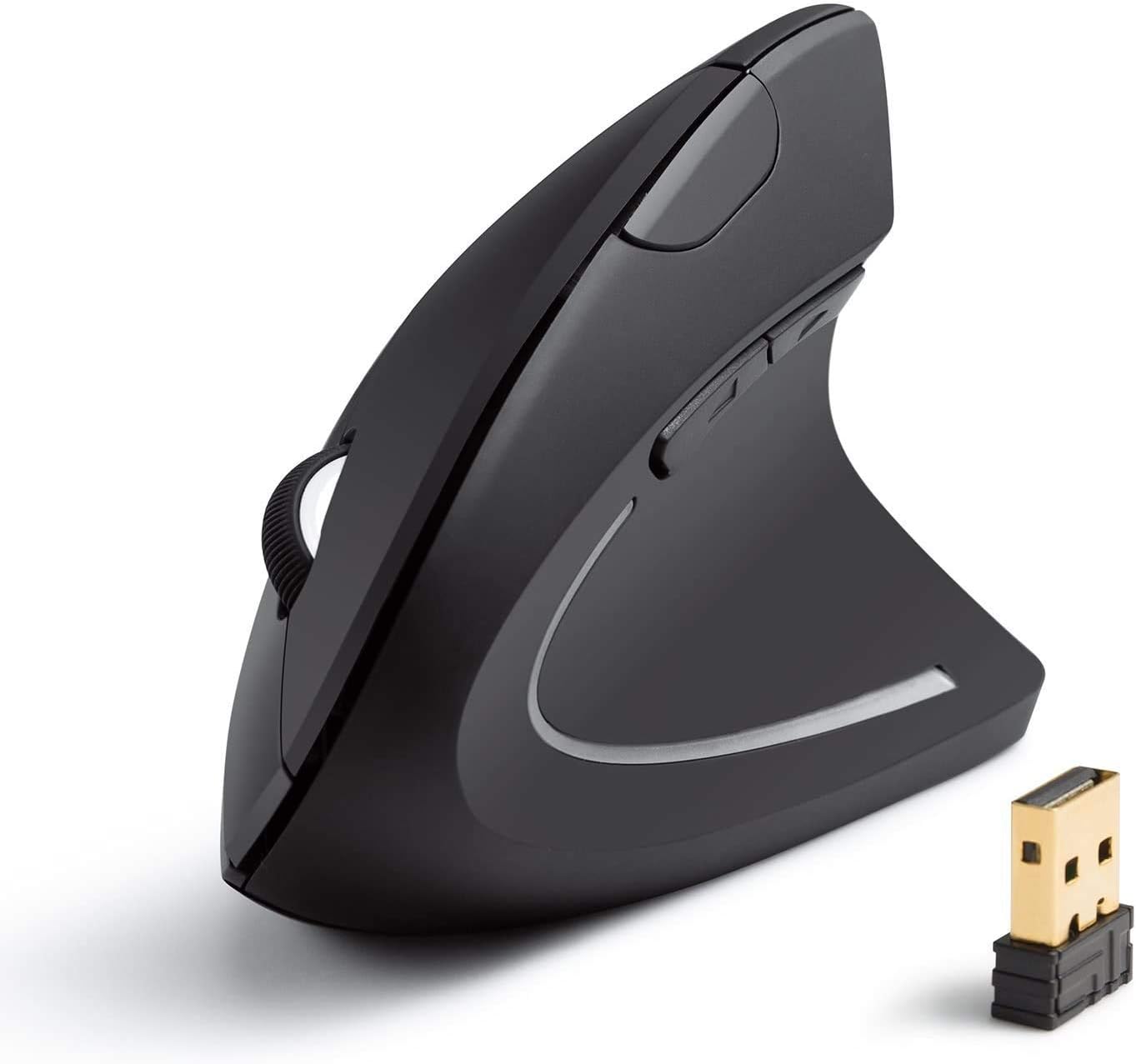
Vertical mice are designed to keep the hand and wrist in a more natural position, reducing the risk of developing conditions like carpal tunnel syndrome. These mice have a vertical grip, which allows the hand to rest in a handshake position. They are ideal for people who spend long hours working on a computer. Some popular ergonomic vertical mice include the Anker Wireless Vertical Ergonomic Mouse (ASIN: B00BIFNTMC) and the J-Tech Digital Wireless Ergonomic Vertical Mouse (ASIN: B01M1JXNP5). These mice come with features like adjustable DPI, programmable buttons, and rechargeable batteries.
Trackball Mice
Trackball mice are another type of ergonomic mouse that can reduce the strain on the wrist and arm muscles. These mice have a stationary ball that is used to move the cursor, rather than moving the entire mouse. This design reduces the need for arm movements, making it ideal for people with conditions like tennis elbow or repetitive strain injury (RSI). Some popular trackball mice include the Kensington Expert Wireless Trackball Mouse (ASIN: B01936N73I) and the Logitech MX Ergo Wireless Trackball Mouse (ASIN: B0753P1GTS). These mice come with features like customizable buttons, adjustable cursor speed, and long battery life.
Factors to Consider When Choosing an Ergonomic Mouse
Hand Size and Shape
When choosing an ergonomic mouse, it’s crucial to consider your hand size and shape. A mouse that’s too small or too big can cause discomfort and even lead to long-term injuries like carpal tunnel syndrome. To determine the right size, measure the length and width of your hand and look for a mouse that matches those measurements. Additionally, consider the shape of the mouse. Some mice are designed with a curved shape that conforms to the natural curve of your hand, while others have a flat design that requires you to twist your wrist to use it.
Grip Type
Another aspect to consider when choosing an ergonomic mouse is your grip type. There are three main types of grip: palm grip, claw grip, and fingertip grip. A palm grip involves resting your entire hand on the mouse, while a claw grip involves holding the mouse with your fingertips and arching your hand. A fingertip grip involves holding the mouse with just your fingertips. Each grip type requires a different mouse design to ensure comfort and prevent strain. For example, a mouse with a high arch is best for a claw grip, while a flatter mouse is better for a palm grip.
Additional Features to Look For in an Ergonomic Mouse
Customizable Buttons
When choosing an ergonomic mouse, it’s important to consider how many buttons you need and if they can be customized. Customizable buttons allow you to program specific functions for each button, which can significantly improve your workflow. For example, you can set one button to copy and another to paste, making it easier to navigate through documents. Look for a mouse with buttons that are easy to reach and that can be programmed with software that is intuitive to use.
Wired vs. Wireless
Another important consideration when choosing an ergonomic mouse is whether you want a wired or wireless option. Wired mice are generally more reliable and have a faster response time, but they can be less comfortable to use due to the cable. Wireless mice offer more flexibility and allow for greater range of motion, but they can have connectivity issues and require batteries. When choosing between a wired or wireless mouse, consider your workspace and whether you need the added mobility that a wireless option provides.
Top Ergonomic Mouse Recommendations
Best Vertical Mice
Vertical mice have become increasingly popular in recent years due to their ability to reduce wrist and arm strain. When it comes to choosing the best ergonomic mouse, vertical mice are a great option for those who spend long hours on a computer. The Anker Wireless Vertical Mouse and the Logitech MX Vertical Mouse are two popular options. The Anker mouse is affordable and has a comfortable grip, while the Logitech mouse has advanced features such as adjustable sensitivity and a rechargeable battery. It’s important to note that vertical mice may take some getting used to, so it’s important to give yourself time to adjust to the new grip.
Best Trackball Mice
Trackball mice are another great option for those seeking an ergonomic mouse. These mice have a stationary ball that controls the cursor, which reduces the need to move your arm and wrist. The Kensington Expert Wireless Trackball Mouse and the Logitech M570 Wireless Trackball Mouse are two popular options. The Kensington trackball mouse has a large ball that is easy to use, while the Logitech mouse is affordable and has a long battery life. It’s important to note that trackball mice may take some getting used to, so it’s important to give yourself time to adjust to the new way of controlling the cursor. When choosing a trackball mouse, it’s also important to consider the size and shape of the mouse to ensure it’s comfortable for your hand.
No matter which type of ergonomic mouse you choose, it’s important to prioritize comfort and functionality. Take the time to research and test different options to find the best mouse for your needs. Remember, investing in an ergonomic mouse can lead to a more comfortable and productive work experience.
Conclusion and Final Thoughts on the Best Ergonomic Mouse for 2021

Recap of Key Points
When it comes to choosing the right ergonomic mouse, there are several key points to keep in mind. Firstly, it’s important to consider the size and shape of the mouse, as well as its weight and grip style. Secondly, you should look for a mouse that offers customizable features, such as adjustable DPI and programmable buttons. Thirdly, the mouse should be compatible with your computer and operating system. Finally, you should consider your budget and look for a mouse that offers good value for money.
Making the Right Choice for Your Needs.
When it comes to choosing the right ergonomic mouse for your needs, there are a few additional factors to consider. Firstly, you should think about your specific usage requirements. For example, if you work with graphic design software, you may want a mouse with a high DPI and programmable buttons for quick access to frequently used tools. Secondly, you should consider any existing health conditions that may affect your choice of mouse. For example, if you suffer from carpal tunnel syndrome, you may need a mouse with a specially designed shape to reduce strain on your wrist. Finally, you should read reviews and do your research to find a mouse that has a good reputation for comfort, reliability, and performance.
